Login

all posts tagged “cooltools”

Tracking Reactions on the Web

Posted by: leelefever on June 2, 2008- 5:00pm

Categories: blogging, buzz, cooltools, statistics

I must admit that each time we post a new video, we go into buzz mode - What are people saying/linking/doing?  Where are they doing it? How many said something?  What do we need to say in response? 

Watching the reaction is something I anticipate and love about the process.  At the same time, I wonder if I'm doing it right.  I'm always looking for new ways to scan the web.  Here are some tools we use - please suggest ideas/sites/tools that you think would help.

Blog Comments - Of course, our blog is the home of the videos, so we pay close attention to the comments.  We've seen the number of comments per video decline in general, which I don't take as a bad sign. Personally, I think people are commenting in other ways, like on Twitter.

Blog Post Views - The views that the blog post receives are certainly a powerful indicator.  However, because the video exists on video hosts, these page views are not comprehensive.

Referrers
- Our blog software (Drupal) tracks referrers - sites sending traffic our way. This is one way to see the sites from which the most traffic is coming.

Google Analytics - On a high level, this is how we measure the overall impact of the video over time. It's a very powerful tool and we look at a number of the stats, but the big one is impact over time - did the video increase views/visits? For how long?  To what degree?

Video Hosts
- The views and ratings (and to a lesser degree comments) on the video hosting sites like You Tube and Vimeo are always useful in measuring traction, etc. You Tube has been our vehicle for having the video shared on blogs, though that may soon change.

Technorati Reactions
- We have a persistent Technorati search for "commoncraft.com." Whenever someone links their site to Common Craft it (hopefully) shows up in a Technorati search. This gives us a view of who is linking to us, what they're saying and how influential they are.  Often, this is how we identify discussions in which we should participate. We use Technorati every day.

Diggs
- When a new video is posted, we usually include a button with the video that allows people to Digg it. We've seen this produce amazing results, but only if the video makes it to the "popular" list and the front page. Otherwise, it almost seems like a distraction.  You have to be pretty provocative to get the Digg community's attention.

Del.icio.us Bookmarks
-  Bookmarks are another way we gauge popularity.  Like Digg, if the bookmark can make onto the popular list, it can drive more traffic and bookmarks.

RSS Subscribers
-  This is more of a long range stat. We pay attention to how the number of subscribers changes in the days after the video is posted.  This can be powerful conversion metric.  If we're doing well, we turn a more and more visitors in subscribers.

Twitter @RepliesTwitter has become our #1 resource for understanding perceptions about our videos.  We always announce the videos on Twitter and the @replies are our first look at what people think.

Twitter Search
- I don't know what we would do without Summize and/or Tweetscan.  We track the search results for "commoncraft " and "plain English " on these services. Often, this reveals how the videos are being spread through Twitter and what people are saying.  When we see people asking questions, we do our best to reply to them.

Twitter Subscribers
- Did we see more subscribers after the video?

Viral Video Countdown - These days, getting onto the Viral Video Countdown front page is a goal and we look for it with each video.  It's one of our consistent, objective ways to see the degree to which the video is being shared on blogs. The Social Media video made it to #2 yesterday. Ice Rocket's Popular Video List is something we check too.

dotSUB translations
- We share each of our videos on dotSUB, where they can be translated into multiple languages.  We love to see this happen and check in often to how many languages are present.

What else should be using for tracking reactions?

Your Neighborhood Needs Instant Journalists

Posted by: leelefever on November 13, 2007- 4:00pm

Categories: cooltools, friends, journalism, seattle, video

Even though the Web makes us all feel like citizens of the world, what matters is often local.  Our neighborhoods and neighbors have a huge impact.  There is a brand-new platform, created by Instivate, a company run by one of our long-time friends and neighbors, that aims to give every neighborhood a site for sharing local news. It's called Instant Journalist.

Here's the scenario:  You sign up for Instant Journalist - it has a monthly fee that's linked to the size of the site.  Right off the shelf, the site is ready for you and your neighbors to start sharing stories, photos and videos, complete with map integration.

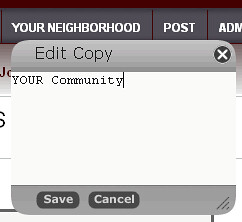
Instant Journalist also has a bunch of cool features that make the site easy to customize.  Here's my favorite:

You can right-click on almost any text on the site and change the copy.  If you don't like the tab that says "Your Neighborhood", you can change it in two clicks - no geekiness required.

You can see a demo of Instant Journalist here or a screencast on the posting process here.  It's new, so if you have feedback or thoughts the folks at Instivate would love to hear it. Congrats to Scott and Instivate for getting it out the door. 

Wiki Video in Multiple Languages via DotSub

Posted by: leelefever on May 30, 2007- 5:00pm

Categories: cooltools, dotsub, language, lesson, show, video, wiki

Just after posting our first video on RSS , I learned a few valuable lessons:

1. Video is inaccessible for the hearing impaired

2. Video is not easy to translate into other languages

3. There is a new site that addresses both of these issues called DotSub .

DotSub makes it easy for me to transcribe the spoken words into text subtitles. Then, once the subtitles exist, it enables DotSub members to voluntarily translate the text into other languages and post the video to their blogs. This makes videos international and more accessible - for free.

So far, the Wiki video has been translated into Chinese, Dutch, German and Swedish . The RSS video has been translated into 11 different languages . I'm just amazed.

Here is the Wiki video in a player that allows you to change languages. Use the Up^ and Down arrows at the bottom to see the subtitles.

Spanking New: 43 Places from the Robot Co-op

Posted by: leelefever on June 22, 2005- 5:00pm

Categories: cooltools, review, robotcoop, seattle, travel

I'll be talking a lot more about this soon, but I wanted to post a quick link to 43 Places, the latest from my homies here in Seattle, the Robot Coop, of 43 Things fame.

Update: At the time of this writing (6/26/05), 43 Places is not yet public, but should be soon.

It's all about where you've been and where you want to go. I'm digging the cool mapping features and the other 43 things-style goodness. Like 43 Things, it's a blog for people who aren't necessarily "bloggers".

Instead of the "Zeitgeist" for 43 Things, they are using "Wanderlust" (to be pronounced with your best German accent) for the same thing on 43 Places.

Big ups to the Robots for getting more of their master plan out into the world.

Tags: 43places, robotcoop, travel, travelblog

Video Conferencing Reviews

Posted by: leelefever on December 1, 2004- 4:00pm

Categories: cooltools, review

I’ve never used video conferencing other than a messing around with a camera on my PC. This being said, I think multiparty video conferencing has a bright future.

An example of “multiparty�? video conferencing is a group meeting online and everyone’s live-action face appears on the screen. Robin Good, someone I consider to be very informed in such things, put together a great review of the video conferencing market right now. Robin's reviews are focused on classroom applications and were posted in response to a discussion on Nancy's White's Online Facilitation list.

Why Did These Tools Make The Cut?

Posted by: leelefever on July 22, 2004- 5:00pm

Categories: cooltools, ourwork

For the past few weeks, I’ve been involved in creating prototypes for Intranet-based learning/communication tools (I know that is ambiguous). Anyway, we’ve put the prototypes in front of about 30 folks to gather feedback. This experience has given me a deeper perspective on the challenge before us. Here are some examples of what we hear:

“If I’m going to use it, it has to fit into the way I’m working. It can’t ADD something else for me to do- I have too much to do. It has to make what I’m trying to do now better or faster. If it doesn’t, I won’t use it and your work will be for nothing�?

These aren’t actual quotes, but they are close. Hearing this, I began to look at the tools I use everyday and think about what allowed me to integrate them into the way I work. What was it about the tools I use that made me switch? I have two examples:

LookOut. Lookout was a free search tool for Outlook and your files (It's no longer available, see below). It indexes your information so searches are fast- and it works. I don’t look through folders anymore- LookOut allows me to get to buried emails and files more quickly than before. It saves me time- a lot of time.
NOTE: Upon visiting the LookOut web site, I see it has been acquired by Microsoft. I imagine we'll be seeing this in Outlook soon.

ieSpell. This is a simple tool that I use almost daily. Anytime I’m writing in a web based form, like through a browser, I use this tool to check spelling. Every weblog post, every Yahoo Groups post, every time I write online, I use this tool to check spelling. IE Spell makes me look better and saves me time by filling a gap in the IE browser.

Both these free tools have made it into my work life with no problem. What have you recently integrated into your work? Why did it make the cut?

Clay Shirky on Public Links- and me on Furl

Posted by: leelefever on July 12, 2004- 5:00pm

Categories: cooltools, socialbookmarking

Many-to-Many: Social link management

Clay provides a short rundown of some of the sites out there offering link management services. I recently tried one of these services "Furl" and I'm intrigued, but the jury is still out in terms of long-term adoption.

Here's why I like these services:

I often find myself reading a site and thinking- "I really want to come back to this, but I don't want to blog it, or add it to my bookmarks (which I never use anyway)." These services give you something to do with that link.

Often, they allow you to click a button (sometimes a "bookmarklet") and add the link to an online space for future reference. Quick and easy.

Furl allows you to categorize each link, rate it, and add comments and keywords for future reference. When I need to find that page again, I consult my Furl page.

The cool part, at least for me, is that this information also become public- and it can be subscribed-to via email. So, I subscribe to a couple of other peoples' Furl sites to keep up with sites they are referencing. Here's my Furl page.

In many ways, I see these services as an easy way to have link-blog. Whenever I see an interesting page that I don't want to blog- I Furl it.

I'm trying it out, but I'd say my chances of long term usage are 55-60%. If it does fly- I could see adding a link to my Furl page from my normal blog.

Also: The Social Software Weblog has more on these services. Go Peter!


I Really Want to Trust Technorati

Posted by: leelefever on July 6, 2004- 5:00pm

Categories: cooltools, thissite

For those of you who may not know, Technorati is a web site that tracks links between web sites (among other things). Webloggers use it to find out who is linking to their blog by putting a URL into the box on this page. The site just passed the 3 million "weblogs watched" number.

Now, I admit that I'm a habitual Technorati user- multiple times a day sometimes. It's a feedback and discovery system for me- and I really dig it. And, I admit to having some selfish pride in the number of sites linking to my weblog.

However, it seems that Technorati is not keeping a good count. Despite new links almost every day, the displayed number of new links and sources hardly ever changes (it hasn't changed in over 2 weeks). And, when I see the linking numbers from the perspective of another web site, it doesn't match either.

Further, I've signed up to get emails for my watchlist, only to get emails that say "No new links today", even when the web site paints a completely different picture. Then, the emails just stopped coming.

I know the site is growing quickly and Mr. Sifry and Co. can only do so much, but I would love more consistency. I'm proud of my links and I want to see the displayed number of weblogs linking to mine be accurate - it means something to me.

The bottom line is that I've come to love the service and I want it to be better by being more accurate.

Are other folks seeing these issues? Could I be doing something wrong?

Comment Spam Fighting Strategy

Posted by: leelefever on July 5, 2004- 5:00pm

Categories: cooltools, spam, thissite

As you know, I've been been pretty fed up with the comment spammers. I have now chosen not to be a pawn in their silly game any longer.

I have now closed the comments on all but the most recent posts on this site. As it is now, any post that is over 15 days old has the comments "closed". So far, I haven't seen comment spam at all since closing these comments.

I'm betting that the lecherous spam-bots focus on archived posts more than current ones. Perhaps their system looks for posts that are over 30 days old. I'm hoping to find the sweet-spot where I can keep posts open for a maximum amount of time without attracting spam.

To close the archived comments, I used MT-Close2 (by The Dead One). This will allow you to easily close all the comments or trackbacks on any entry that is "X" days old.

Also, I use Jay Allen's MT-Blacklist for blacklisting and most importantly for despamming (removing the offending comments).

It's so nice to have these tools available- they have made my life easier.

Using NewsGator and MT Bookmarklet to Post Faster

Posted by: leelefever on March 24, 2004- 4:00pm

Categories: blogging, cooltools, thissite

This may be old news, but I just realized a way to use Movable Type's Bookmarklet feature and NewsGator in Outlook to post weblog entries more quickly.

First, you need to know about bookmarklets. From the MT tool: "Setting up a bookmarklet to post to Movable Type allows you to perform one-click posting and publishing without ever entering through the main Movable Type interface."

Once you create a bookmarklet (from the main MT menu), you can go to any web site and click on your bookmarklet and an MT page will be generated that automatically contains an html reference to the site you're on. I use the Bookmarklet in the "Links" section of my browser for quick posting.

I also use NewsGator and often find myself viewing web sites within Outlook. (NewsGator is an RSS reader that integrates with Outlook). In this case, I haven't previously been able to use the bookmarklet within Outlook. I'd have to copy the link into a browser to post.

Then I figured out an easier way...

Just like you can drag "Favorites" into a browser's "Links" section for quick reference, you can drag the bookmarklet into the "Outlook Shortcuts" menu.

So now, I can be reading RSS feeds in Outlook, view a site in Outlook, click the bookmarklet in the shorcuts menu and post to my weblog without ever opening a browser. Such good, efficient fun.


Recent Post Topics

Subscribe with RSS